



Recently Walmart has added a new feature to the Enhanced Returns program. This feature is called Refund Adjustments and can be used in various situations where you need to submit a partial or full refund manually.
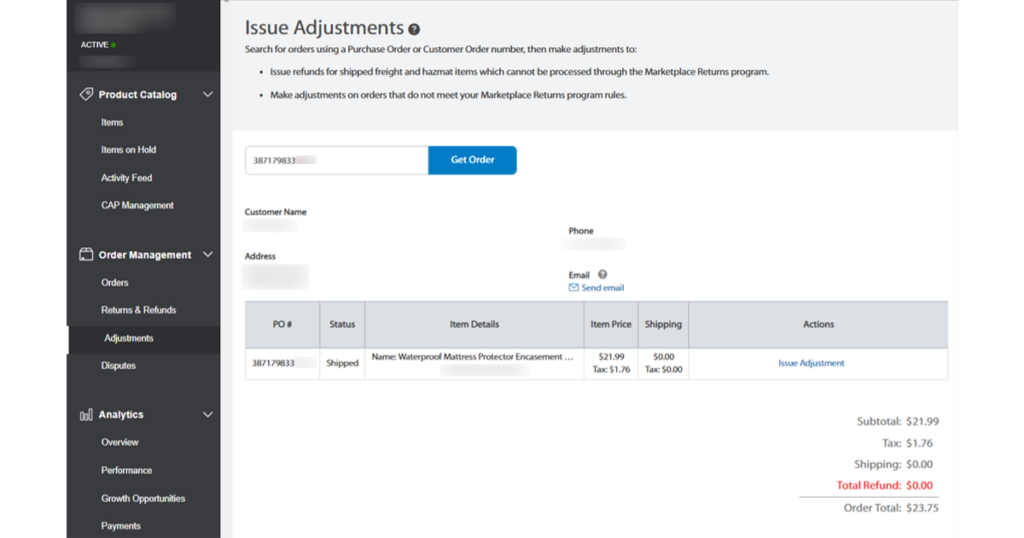
Most Walmart refunds are processed automatically after the return is delivered to the seller, but there might be cases where you need or want to issue a refund without the return. That’s where the Walmart Refund Adjustments come into play. For example, you can use it when:
- The customer received a faulty or incorrect item, decided to keep it, and requested a partial refund.
- Only one item from the order needs to be refunded.
- You want to submit the refund even though the customer did not initiate a return.
In the adjustment section, you can issue a refund for any order (which does not have any other refunds open). You can also choose the specific item from the order and issue a full or partial refund for each line item.
To use this feature, go to the Adjustments tab in the Order Management section. Input the order ID and click Get Order. Select Issue Adjustment for the specific order line and provide the required information. After you complete this process, the system will update the refund amount and process it.

Please remember that if a customer reaches out to you asking for a refund to a different card not used in the order, you cannot do that. The payment method for refund cannot be changed so in such case you need to direct the buyer to Walmart Customer Care.
You can find more information about Walmart Refund Adjustments here, or contact our support team if you have further questions.
