


Orders

Discounted Shipping Labels
Save up to 83% on shipping with UPS, USPS, FedEx, DHL, and more.

Batch Shipping
Process multiple orders and print shipping labels in batches.

Profit & Loss
Track profits, shipping costs, marketplace fees, and other expenses.

Smart Rates
Automatically compare shipping rates to find the best option.

More about Order Management

Inventory

Real-Time Inventory Synchronization
Automatically sync inventory across all your sales channels.

Bundles and Kits
Create bundles and kits with automatic inventory and order updates.

Low Stock Alerts
Set stock thresholds for products so you know when to reorder.

Connect Your WMS
Connect your warehouse management system to sync inventory and orders.

More about Inventory Management

Popular Integrations

Latest ecommerce news, updates, and tips.
Sign up for our newsletter

Walmart Performance Dashboard Revamped

It is now much easier and faster to check your overall standings on the Walmart marketplace, thanks to the new performance dashboard design. All important information about the Orders & Fulfillment is now displayed in the form of visual graphs with links to details and complete reports.
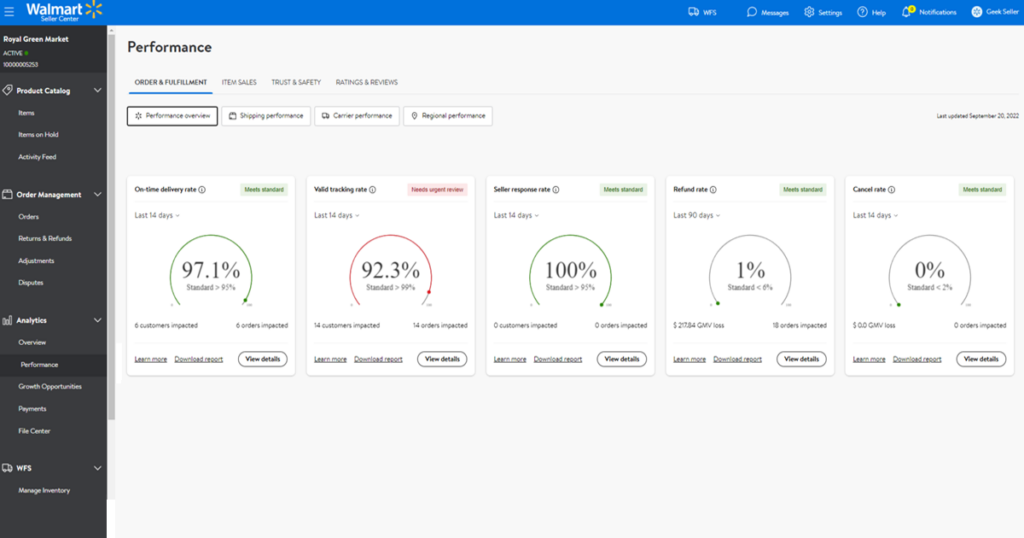
You can access new performance tab on your Walmart Seller Center through Analytics > Performance section. Additionally, you now clearly see a warning when some of your metrics are off, and you need to pay them more attention.

Orders and fulfillment metrics are now divided to:

  • On-time delivery rate
  • Valid tracking rate
  • Seller response rate
  • Refund rate
  • Cancel rate

It is crucial to maintain good performance on Walmart as it is the main factor taken into consideration when the account is at risk of suspension. Now you can see it effortlessly in one place, so make sure to check it often.

Enjoyed this post?

Check out our latest updates, follow our co-founder on LinkedIn for eCommerce insights, and sign up for our newsletter!