




Order cancellations impact your metrics, customer experience, and fulfillment costs. If you automate fulfillment with Amazon or Walmart, the risk is higher because orders can be transmitted before a customer cancels. Below is a simple and consistent approach to reduce that risk and stay compliant with TikTok Shop policies.
Use an order hold before sending to Amazon or Walmart
If you automate fulfillment, you should delay sending orders to your fulfillment provider.
This option is available when you use a system that supports order automation. For example, GeekSeller provides this feature inside Automation Rules, where you can automatically manage order flow and keep new orders on hold for a defined period.
We suggest:
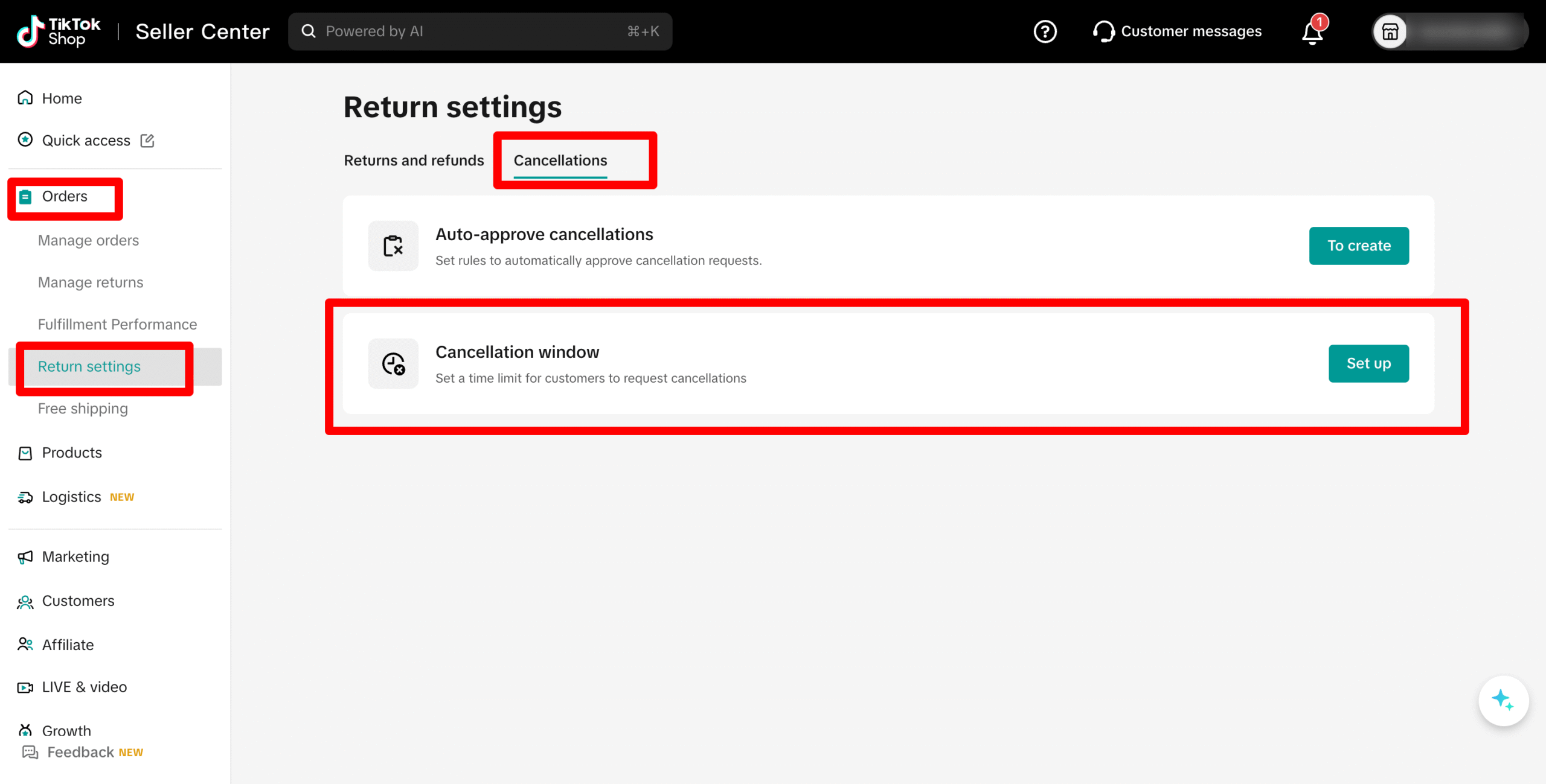
- Set the TikTok cancellation window to 5 hours
- Set your automation rule to hold orders for 6 hours
With this setup, customers can cancel within their allowed window, and canceled orders are filtered out before being sent to Amazon or Walmart.
On TikTok Shop, cancellation settings can be managed in Seller Center under: Orders > Return Settings.
Know when customers can cancel without approval
Based on TikTok Shop policy:
- Customers can cancel within the first hour during the Pending period. This is typically auto approved.
- For Ship by Seller, if you do not respond to a cancellation request within 24 hours, TikTok may auto approve it.
- If you fail to update the order status within required SLAs (Service Level Agreement), orders may be auto canceled.
- If tracking is not uploaded on time, cancellation requests may be auto approved.
Fast action and accurate status updates are critical.
Keep order statuses up to date
After payment confirmation, orders move to Awaiting Shipment.
In general:
- You have 3 business days to update to Ready to Ship
- If not updated within 7 days, the order may be auto canceled
TikTok may notify customers before auto cancellation and allow them to choose to wait. If they do not respond, the order is auto canceled and refunded.
Upload valid tracking on time
For Seller Shipping:
- Add a correct tracking ID, carrier, and service
- Ensure tracking matches the label
- Upload tracking only when the package is actually handed to the carrier
Incorrect tracking or long delays between Awaiting Collection and In Transit can lead to complaints and enforcement.
Fraudulent shipping behavior such as fake tracking, unpaid postage, or shipping from another retailer can result in account restrictions or suspension.

Do not ask customers to cancel
If an item is out of stock or damaged:
- Inform the customer immediately through in app messages
- Cancel the order yourself
- Issue a full and prompt refund
Seller initiated cancellations affect your Seller Fault Cancellation Rate, so inventory accuracy is essential.
Simple configuration that works
If you sell on TikTok Shop and automate fulfillment with Amazon or Walmart:
- Set TikTok cancellation window to 5 hours
- Use an automation system like GeekSeller to hold orders for 6 hours in Automation Rules
- Release orders automatically after the hold
- Always update status and tracking within SLA
This structure significantly reduces the risk of shipping canceled orders and helps protect your performance metrics.
If you need help setting up Automation Rules in GeekSeller, contact our support team and we can configure it for you.
