




If you use Amazon Multi-Channel Fulfillment (MCF) to ship TikTok Shop orders, tracking has recently become more complicated. TikTok introduced stricter fulfillment rules, including limitations on using non–TikTok-provided USPS labels, which made it harder for sellers relying on Amazon MCF. Amazon’s new Amazon Fulfillment Tracking Number (AFTN) is designed to solve this exact problem.
AFTN is essentially an umbrella tracking number that becomes available within minutes, signaling “we’ve received your order and it’s being processed,” even before the final carrier tracking number is assigned.
Below is a simple explanation of what AFTN is, why it matters, and how to use it.
What is Amazon Fulfillment Tracking Number (AFTN)?
AFTN is a tracking number generated by Amazon within minutes after an MCF order is created.
It appears before the package is picked up by a carrier and before traditional tracking numbers like Amazon Logistics, FedEx, UPS or USPS are available.
At the moment, AFTN support is limited:
- TikTok Shop is currently the main (and first) platform that officially accepts AFTN
- AFTN is available only for US deliveries
- Only single-item MCF orders are supported for now
Support for additional platforms may be added in the future, but today TikTok Shop is the primary use case.
Why AFTN matters for TikTok Shop sellers
TikTok Shop requires sellers to submit valid tracking numbers quickly. At the same time, TikTok has recently limited the use of non–TikTok-provided USPS labels, which created issues for sellers fulfilling orders through external systems like Amazon MCF.
AFTN helps bridge this gap.
Main benefits:
- Helps meet TikTok Shop fulfillment SLA
- Tracking is available within minutes after order creation
- Avoids delays caused by waiting for carrier tracking numbers
- Reduces risk related to TikTok’s USPS label restrictions
- Improves customer visibility and reduces support questions
Once a carrier is assigned, both AFTN and the final carrier tracking number remain valid and show the same tracking events.
How to find AFTN in Amazon Seller Central
- Log in to Seller Central
- Go to Orders → Manage Orders
- Search for your MCF order using the order ID
- Open the order and go to the Shipments tab
- Copy the Amazon Fulfillment Tracking Number (for example: AFTN1161384)
AFTN is usually generated within a few minutes after the order is placed. If you don’t see it right away, refresh after a short wait.
At this stage, the carrier may still show as “Unassigned” — this is expected.
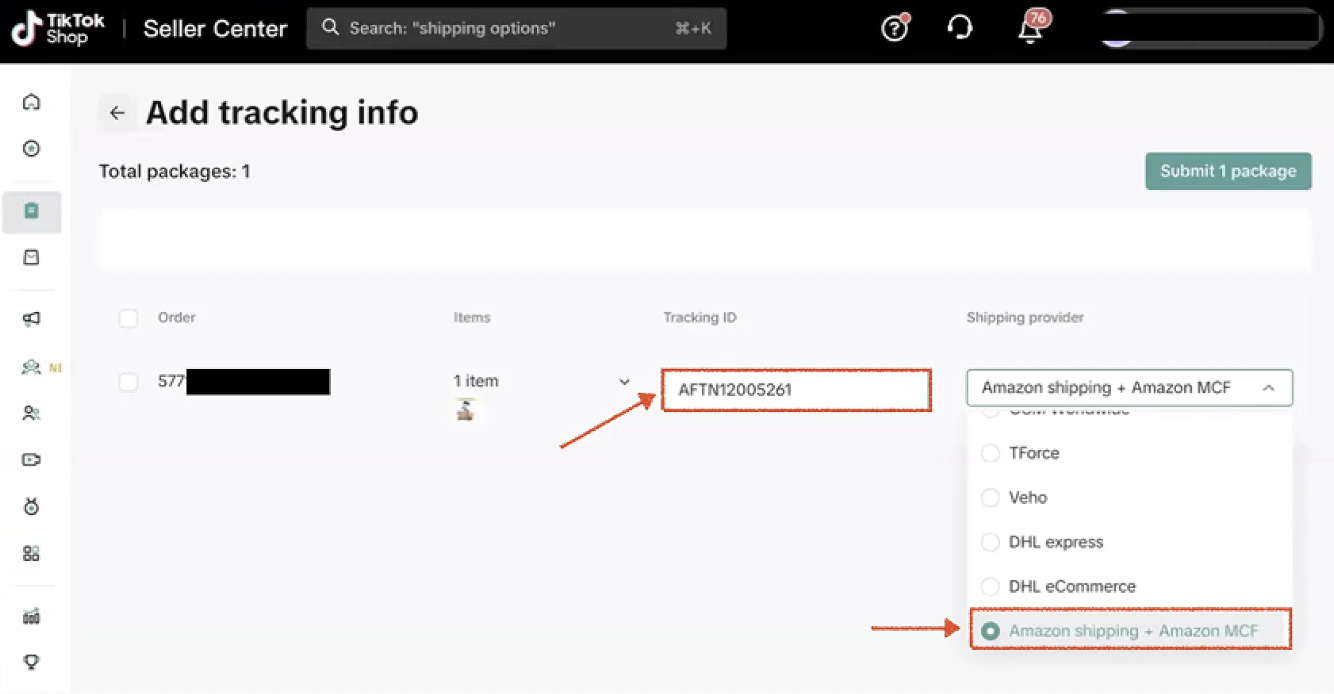
How to upload AFTN to TikTok Shop
- Log in to TikTok Shop Seller Center
- Go to Manage Orders
- Select the order that is waiting for shipment
- Click Add tracking info
- Paste the AFTN as the Tracking ID
- Select Shipping provider: Amazon shipping + Amazon MCF
- Submit the package
You can upload AFTN as soon as it appears in Seller Central. There is no need to wait for the final carrier tracking number.
If you use GeekSeller MCF integrations, AFTN is handled automatically and no manual action is required.
Tracking events customers can see with AFTN
Using AFTN provides visibility even before shipping starts:
- Order Preparing – items picked and packed at the fulfillment center
- Carrier Assigned – label created and carrier selected
- Shipped – package has left the fulfillment center
These early events help set expectations and reduce customer confusion.
Where customers can track orders
Customers can track their orders:
- Directly in the TikTok app once AFTN is uploaded
- Via the Swiship tracking page using the AFTN
See the official Amazon’s post for details.
